
An unpatched server, an exposed service or a misconfigured application can provide attackers with an avoidable route into an organisation. The difficulty is knowing which weaknesses exist, where they sit and which ones need attention first. Vulnerability scanning helps answer those questions before someone else finds the gap.
This guide explains what vulnerability scanning is, the different types of scans, how to interpret results and how to build a practical programme. It also explores the limits of automated tools, including an often overlooked distinction: finding software weaknesses is not the same as checking removable media for malware.

Vulnerability Scanning at a Glance
01
Identify
Find known vulnerabilities and insecure configurations across approved assets.
02
Prioritise
Assess exposure, exploitability and business impact before deciding what to fix.
03
Verify
Apply fixes or mitigations, then retest to confirm that risk has been reduced.
What Is Vulnerability Scanning?
Vulnerability scanning is the systematic use of tools to identify known security weaknesses across IT assets such as servers, workstations, networks, applications and cloud systems. A scanner gathers information about a target, compares what it finds with vulnerability and configuration checks, then reports potential problems for investigation and remediation.
In simple terms, it is a repeatable way to ask: what do we have, what might be vulnerable, how exposed is it and what should we fix? A scan is a starting point for action, not proof that an environment is secure.
What Does a Vulnerability Scan Actually Find?
Depending on the tool, access and scan type, findings may include outdated software or firmware, missing security patches, unsupported operating systems, insecure network services, weak configuration choices, exposed management interfaces, potentially vulnerable web application components and known vulnerabilities identified by CVE references.
For example, a scanner might identify an internet-facing VPN appliance running a version associated with a published vulnerability. The security team must then establish whether the affected feature is enabled, whether the device is actually exposed, whether the finding is accurate and what compensating controls exist. Only then can it make a defensible remediation decision.
How Does Vulnerability Scanning Work?
1. Discover Assets and Define the Scope
Start with an accurate inventory: IP addresses, hostnames, cloud resources, operating systems, application owners and critical business services. Agree which assets can be tested, from where, with whose permission and at what times. Unknown and unmanaged assets are an immediate blind spot.
2. Select the Right Scan Method
Choose internal or external scanning, authenticated or unauthenticated checks, and application-specific tests where needed. Credentials can give a scanner greater visibility into installed software and missing patches, while external scans show what a potential attacker might see from outside the network.
3. Run Controlled Checks
The tool probes approved targets, enumerates relevant services or software and applies detection logic. Some checks are passive or read-only; others may place additional load on systems. In operational technology (OT) and other sensitive environments, scan approval, change control and safe testing methods are essential.
4. Validate and Prioritise Findings
Review suspected vulnerabilities against the actual asset configuration. Use severity scores such as CVSS as one input, not the whole answer. Internet exposure, active exploitation, asset importance, available mitigations and the consequence of disruption may make a technically ‘medium’ issue more urgent than a ‘critical’ issue on an isolated, non-essential device.
5. Fix, Mitigate and Rescan
Assign each finding to an owner, record a target date, apply patches or safer configurations, and verify the outcome with a subsequent scan or other appropriate test. Where immediate remediation is not possible, document temporary controls and formal risk acceptance. A completed scan with no follow-up does little to reduce real-world risk.
Types of Vulnerability Scanning
Network Vulnerability Scanning
Network scanners assess hosts, open ports, exposed services, device configurations and associated known vulnerabilities. They are useful for identifying unnecessary services, ageing devices and gaps across internal or external network ranges.
Host and Endpoint Vulnerability Scanning
These checks focus on individual servers, desktops and other managed endpoints. With suitable access, they can assess installed packages, security updates, operating system settings and local configuration.
Web Application Vulnerability Scanning
Dynamic application security testing (DAST) tools examine running websites and web applications for detectable weaknesses, such as certain injection risks or insecure configurations. Their coverage depends on authentication, crawl depth and application complexity. They cannot reliably identify every business-logic flaw or replace specialist testing.
Cloud and Configuration Scanning
Cloud assessments inspect virtual machines, exposed services, storage permissions and infrastructure settings. They should sit alongside cloud security posture management and provider-specific configuration checks, because not every cloud weakness is a traditional software CVE.
Database, Container and Dependency Scanning
Specialist tools can assess database services, container images and third-party software dependencies for known vulnerable versions and insecure settings. These checks are especially helpful when embedded into software development and deployment workflows.
Internal versus External and Authenticated versus Unauthenticated
An external scan tests what is visible from outside an organisation; an internal scan can reveal issues after network access has been gained. Authenticated scanning can inspect system details using authorised credentials, while unauthenticated scanning offers a more limited outside-in view. Mature programmes commonly use several approaches rather than choosing just one.
Vulnerability Scanning vs Penetration Testing vs Malware Scanning
These activities complement one another, but they answer different questions.
Vulnerability Scanning
Which known weaknesses or suspect configurations can automated checks identify? It provides broad, repeatable coverage, but may produce false positives or miss complex exploit paths.
Penetration Testing
Can a skilled tester demonstrate that a weakness or combination of weaknesses can be exploited in an authorised scenario? It is usually more contextual and manual, with a defined scope and rules of engagement.
Malware Scanning
Does a file, endpoint or removable device contain potentially malicious content or behaviour? Antivirus and multi-engine malware analysis look for malicious software, not necessarily missing patches or vulnerable network services.
A USB drive can contain a malicious file even if a network vulnerability scan reports no findings. Equally, a fully malware-scanned USB device does not prove the receiving workstation is patched or correctly configured. Security teams need both forms of protection where the risks apply.
Why Is Vulnerability Scanning Important for UK Organisations?
Regular scanning makes cyber risk more visible. It helps organisations find preventable exposure, support timely patching, verify whether fixes worked and communicate outstanding risk to accountable owners. It can also provide evidence for parts of a wider security governance or assurance programme, although a scan alone does not demonstrate compliance.
The practical benefit is greatest when vulnerability data is connected to a current asset inventory, patch management, change control and incident response. It is particularly valuable where there are many systems, multiple teams or third-party managed assets.
What Are the Limitations?
A vulnerability scanner cannot guarantee detection of zero-day weaknesses, every business-logic issue or every vulnerability in unsupported technology. Findings may be false positives, and successful checks can still miss systems that were offline, inaccessible or excluded. Vulnerability databases and scanner signatures also vary between products.
Scanning sensitive OT devices without proper planning may risk availability. And scanning the software estate does not, by itself, stop malicious files arriving through USB drives, contractors or other external media.
How Often Should Vulnerability Scans Be Performed?
There is no single schedule that suits every system. A sensible baseline is regular, risk-based scanning, plus additional assessments after significant changes, deployment of new services, discovery of serious vulnerabilities or relevant security incidents. Internet-facing services often need more frequent attention than stable, isolated systems.
For critical assets, continuous exposure monitoring or frequent authenticated assessments may be appropriate if operationally safe. For OT, agree maintenance windows, vendor guidance and non-disruptive approaches first. The real measure of programme quality is not the number of scans, but how quickly meaningful risks are investigated and resolved.
How to Prioritise Vulnerability Scan Results
A raw scanner report can contain hundreds of alerts. Treating them as an undifferentiated list wastes time. Prioritise using a combination of exploitability, exposure and business impact.
A Practical Vulnerability Triage Checklist
For instance, an actively exploited vulnerability on a public remote-access gateway may warrant urgent action, while a similarly scored issue on a disconnected test machine can follow a different plan. CVSS helps describe technical severity; it is not a substitute for operational judgement.

Vulnerability Scanning Tools: What to Look For
Commonly evaluated options include Tenable Nessus for vulnerability assessment, Qualys VMDR for wider vulnerability management, Greenbone/OpenVAS for open-source-oriented scanning, and OWASP ZAP for web application testing. Microsoft Defender Vulnerability Management may also be relevant to organisations already using Microsoft’s endpoint ecosystem. Product capabilities, licensing and deployment models change, so assess current documentation before selecting a platform.
Compare products on detection coverage, authenticated scanning, asset discovery, integration with ticketing and patch systems, reporting quality, false-positive handling, access controls and suitability for your environment. Test with representative assets before committing. Free or community tools can be useful, but they still require skilled configuration and analysis.
Vulnerability Scanning in Industrial and Air-Gapped Environments
Industrial control systems (ICS), operational technology and classified networks often impose stricter availability, connectivity and data-transfer requirements than ordinary office IT. An aggressive probe that is acceptable against a test web server may be unsuitable for a legacy controller supporting a live process.
Start with a documented architecture, vendor-approved methods and passive discovery where practical. Coordinate testing with plant owners, assess changes in a safe environment and separate risk identification from any action that could interrupt production.
Where updates, diagnostic files or operational data move between isolated environments, vulnerability management also needs a controlled transfer process. Tyrex’s approach to industrial control systems security focuses on a specific part of that challenge: reducing the risk of malware entering through removable media. That complements, rather than replaces, vulnerability assessment of the systems themselves.
Where USB Malware Scanning Fits
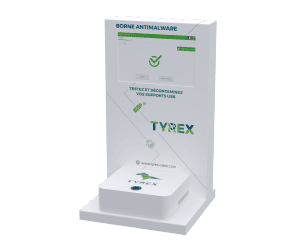
A vulnerability scan checks for security weaknesses in systems and services. A dedicated removable-media security workflow inspects untrusted files or devices before they are introduced to more sensitive assets. Both controls can form part of a defence-in-depth strategy.
For teams managing external USB drives, contractors’ media or cross-boundary file transfers, explore Tyrex’s removable media security solutions and enterprise USB security approach. These measures help address an entry route that conventional network vulnerability scanning is not designed to cover.
How to Build a Vulnerability Scanning Programme
Step 1: Establish Ownership
Assign responsibility for assets, scanner administration, remediation and independent verification. Agree a route for escalating risks that cannot be fixed within normal timescales.
Step 2: Build a Reliable Inventory
Record what is connected, its business purpose, its owner, its exposure and whether it is safe to scan. Include cloud resources and third-party managed technology where contracts permit.
Step 3: Segment Assets by Risk
Define scan policies for internet-facing services, endpoints, production servers, applications and operational technology. Do not assume one method is appropriate everywhere.
Step 4: Test and Tune
Pilot checks against representative systems, validate credentials, monitor load, review false positives and document exclusions. Obtain explicit authorisation before any active test.
Step 5: Turn Findings into Work
Integrate tickets, owners, deadlines and evidence of remediation into normal operational processes. Track repeat findings, overdue high-risk exposures and assets that have not been assessed.
Step 6: Verify, Report and Improve
Rescan after fixes, assess exceptions, update the inventory and provide leadership with a clear picture of residual risk. Review the programme after infrastructure changes or significant incidents.
Make Vulnerability Scanning Part of a Wider Security Strategy
Vulnerability scanning is most effective when findings lead to verified fixes. It identifies weak points, supports informed prioritisation and gives security teams a repeatable way to measure exposure. But secure operations also depend on access control, segmentation, monitoring and safe handling of untrusted files and devices.
Frequently Asked Questions
Select a question to expand the answer.
What Does Vulnerability Scanning Do?
It identifies known vulnerabilities and suspicious configurations across approved digital assets, helping teams decide what to investigate and remediate.
What Are the Two Main Types of Vulnerability Scans?
A common high-level distinction is internal versus external scanning. Another important distinction is authenticated versus unauthenticated scanning. Neither pair covers every category, because network, host, web and cloud scans target different technologies.
Can Vulnerability Scanning Be Automated?
Yes. Scheduled scans, credentialed checks and some reporting can be automated. However, asset scoping, validation, prioritisation and remediation still need accountable human oversight.
Is There a Free Vulnerability Scanner?
Yes. Open-source and community options exist, including the Greenbone/OpenVAS ecosystem and OWASP ZAP for web application testing. Suitability and support depend on your requirements.
Does Vulnerability Scanning Detect Malware?
Not necessarily. Its principal purpose is to detect vulnerabilities and misconfigurations. Dedicated malware scanning is designed to examine suspicious files, processes or devices; organisations may need both.
Can a Vulnerability Scan Replace a Penetration Test?
No. Automated scanning provides scalable coverage for many known weaknesses. Penetration testing investigates attack paths and exploitability in more depth within an agreed scope.
Can Vulnerability Scans Be Dangerous for Industrial Equipment?
Some active scans can create additional traffic or trigger unexpected behaviour in fragile or legacy devices. Follow vendor advice, secure approval and use risk-appropriate testing methods.